
This article was automatically translated from Japanese using AI. The Japanese version is the authoritative version.
Bonsai is a visual programming language introduced in a 2015 paper.
It allows you to acquire data from sensors and process it at the same time.

A key feature of Bonsai is that complex processing pipelines can be assembled easily, much like putting together a puzzle, and the results of that processing can be checked in real time.
Bonsai can also be combined with other analysis software (DeepLabCut, Open Ephys, BonVision, and so on) and with hardware (cameras, controllers, microcontrollers, etc.), making it highly extensible.
Because you can carry out complex analysis and processing intuitively without having to learn a programming language that looks intimidating, anyone can use it easily, and it broadens the range of experiments you can run.
The paper describing Bonsai is available here.
You can install Bonsai from here.
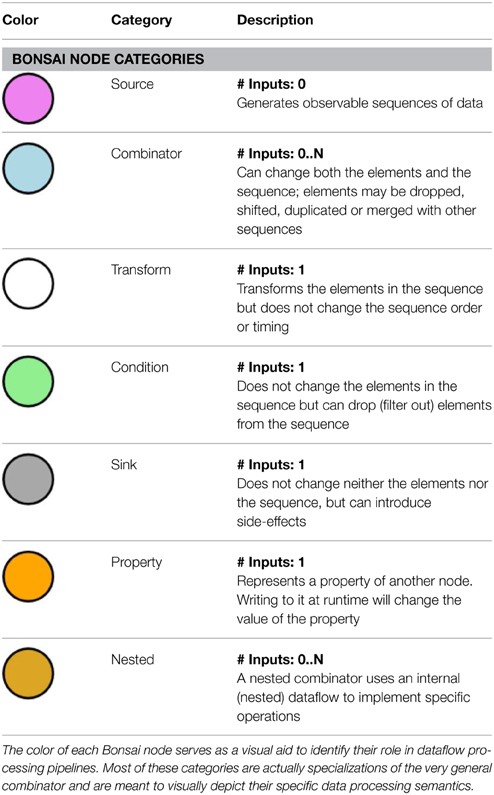
Image taken from the paper.
Each circle is called a node and represents an individual operation.
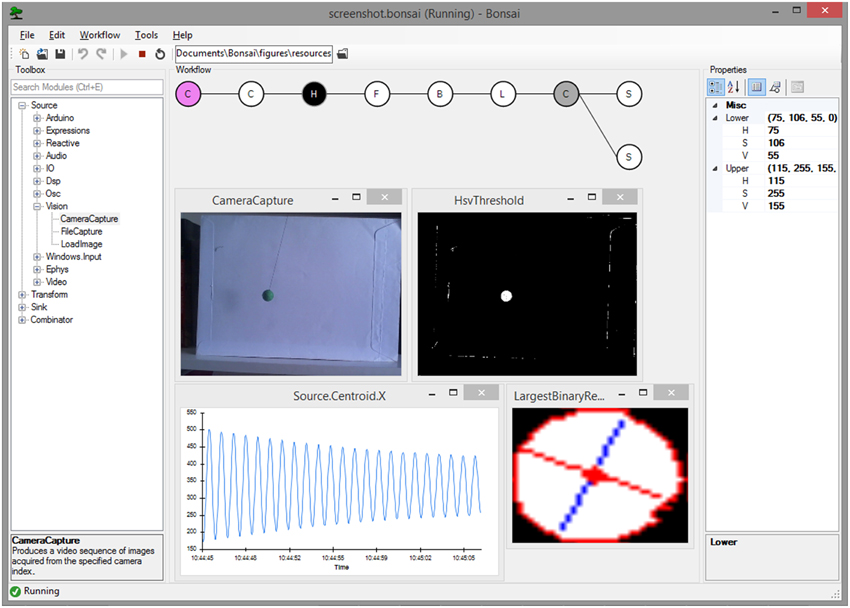
This is what the screen looks like when Bonsai is actually running (taken from the paper).
On the left you can search for nodes and add the one you need; in the central panel you arrange nodes to build up a pipeline while visualizing what it does; and on the right are the detailed settings for each node.
The windows popping up in the main panel show the execution status of each node; for a camera capture node, for example, the live camera image can be displayed.
It may look difficult at first glance, but seen this way it turns out to be surprisingly straightforward.
Now let’s actually install it.
That said, all you need to do is download it from this site.
Just open the downloaded “Bonsai-*.*.*.exe” file and run the installer.
Note that security software such as Trend Micro may block the installation.
Once Bonsai is installed, both Bonsai and Bonsai (x86) will appear in your list of applications.
For normal use either one is fine, but occasionally one of them will fail to run; in that case, trying the other one often works.
One drawback is that Bonsai currently runs on Windows only, and is not supported on Linux or macOS.
That may change in the future, but it is something to keep in mind.
From the next post, I’ll start actually using Bonsai.